
How to Read the E-Z Win® Form
Tip
Want to see the form in action?
The E-Z Win® Form is our comprehensive race analysis tool. It combines our proprietary rating system with detailed horse information, past performances, workouts, and visual indicators to help you make informed handicapping decisions. This guide walks through every section of the form.
On mobile, the same information is presented in a condensed single-column layout.
Race Header
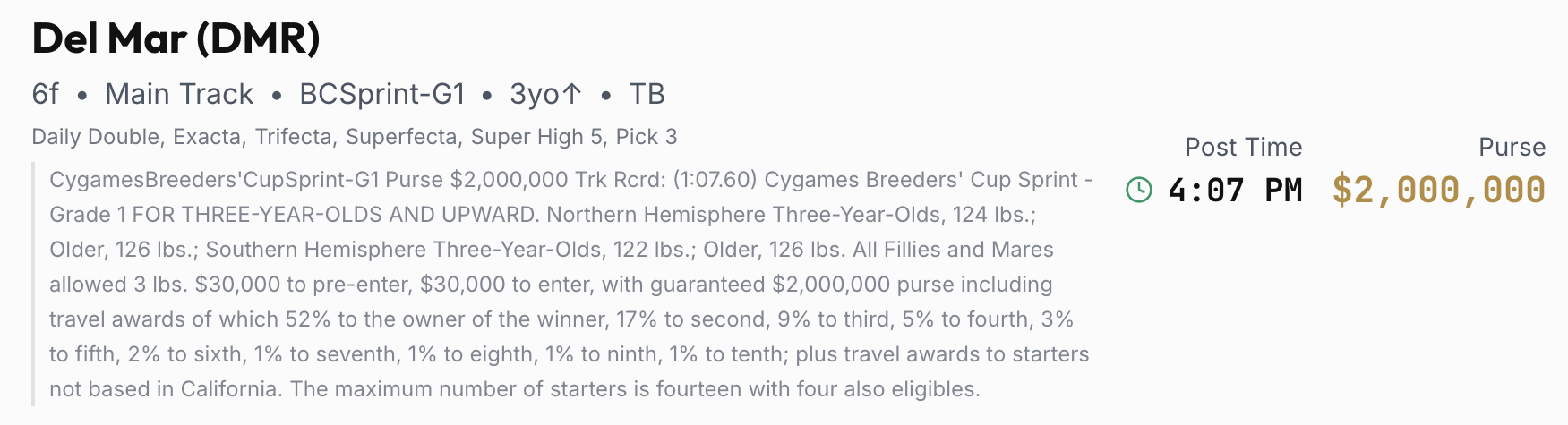
The race header appears at the top of each race and provides key information at a glance:
- Track Name & Code - The track hosting the race (e.g., "Aqueduct (AQU)")
- Race Details - Distance, surface, race classification (e.g., "Mdn Sp Wt"), and any sex or age restrictions
- Post Time - When the race is scheduled to start
- Purse - The total prize money for the race
- Wager Types - Available bets and their minimum amounts
- Race Conditions - The official conditions describing which horses are eligible to enter
Race Selector

The race selector bar sticks to the top of the screen as you scroll. Numbered buttons let you jump to any race on the card. Hover over a race number to see a quick preview of the post time, classification, distance, surface, and purse. The currently selected race is highlighted.
Surface & Condition Selectors

These selectors control how horses are analyzed:
- Surface - Choose between Auto, Dirt, Turf, or Synthetic. "Auto" uses the race's scheduled surface. The current official surface is shown in gold.
- Condition - Choose the track condition (e.g., Fast, Muddy, Firm, Yielding). "Auto" uses the current reported condition.
Why this matters: Our ratings change based on surface and condition. A horse that rates well on a Fast dirt track may rate completely differently on a Sloppy track. And when a turf race comes off the grass, the rankings can shift dramatically — horses that excel on turf often struggle on dirt, while dirt specialists who were afterthoughts on turf can suddenly become contenders. On live race days, the form automatically picks up real-time condition and surface changes and updates the ratings accordingly — no action needed on your part. You can also use these selectors manually to preview "what if" scenarios, like checking how the field would rate if rain turns the track Sloppy later in the day.
Understanding the Tiers
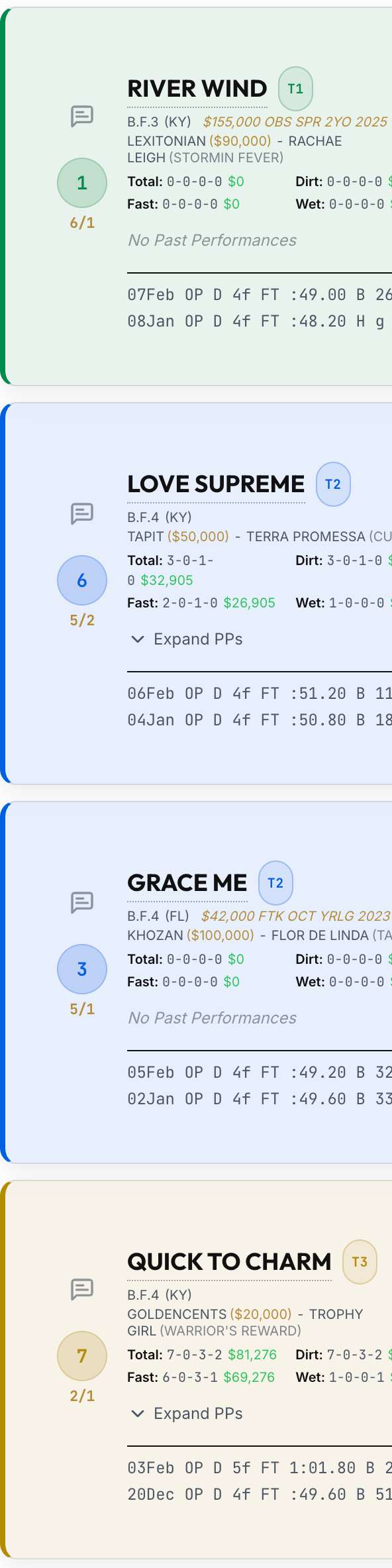
The tier system is the foundation of the E-Z Win® Form. Horses are grouped into color-coded tiers based on our proprietary rating, displayed as the background color of each horse's program number circle:
- Tier 1 (Green) - Our top-rated horses. Key or box these for single-race exotics, or use them as singles in multi-race bets.
- Tier 2 (Blue) - Strong contenders. Consider including them in your combinations.
- Tier 3 (Gold) - Competitive but less likely to win outright.
- Tier 4 (Orange) - Longer shots with some chance.
- Tier 5 (Red) - Unlikely winners, but every race has surprises.
- Unrated (Grey) - We did not rate this horse, usually due to insufficient data (e.g., foreign horse). This does NOT mean the horse is bad - examine these horses manually.
Within each tier, horses are ranked from best to worst. However, horses in the same tier are typically close in ability and separating them is the art of handicapping. Each horse also has a numerical Rating displayed in the stats area, colored to match its tier.
For a deeper look at what goes into our ratings and how to use them, see How Our Ratings Work.
Reading a Horse Entry

Each horse in the race gets its own card. Here's what you'll find:
Program Number & Morning Line
The large colored circle shows the horse's program number with the tier color as background. Below it, the morning line odds (ML) are the track handicapper's pre-race estimate of each horse's chances, set before any betting occurs.
Horse Info
- Name - The horse's registered name in bold
- Color.Sex.Age (Birthplace) - For example, "Dk B/Br.M.7 (KY)" means Dark Bay/Brown Mare, 7 years old, born in Kentucky
- Pedigree - Sire (stud fee if available) - Dam (Dam's Sire)
- Auction Price - If available, the most recent auction purchase price, sale name, and year are shown in gold (e.g., "$110,000 FTI SPR 2YO 2021"). This can help gauge the investment and expectations for the horse.
- Racing Record - Career starts-wins-places-shows with earnings, plus surface-specific records
Weight, Claiming Price & Medication
- Wt - Total weight the horse carries (jockey + equipment). If the jockey is overweight, extra pounds are shown in yellow.
- Clm - The claiming price, if applicable. In claiming races, any horse can be "claimed" (purchased) for this price.
- Med - Medication codes. "L" = Lasix, "B" = Bute. First-time medication is highlighted with a dark badge. Changes from last race are shown in green.
- Eq - Equipment codes (e.g., "b" for blinkers). Changes from last race are shown in green.
Connections
- Last Race (LR) - A quick summary: track, surface, class, finish position/field size, and days since. Days since last race is highlighted in red if the horse is coming off a layoff.
- Owner - The horse's owner.
- Trainer (Tr) - Name and current meet statistics. If the trainer changed, the previous trainer is shown with strikethrough.
- Jockey (Jk) - Name and current meet statistics. If the jockey changed, the previous jockey is shown with strikethrough and the new jockey in green.
Click (or hover on desktop) any trainer or jockey name to open a Stats Popover with detailed performance breakdowns.
Stats Popover*
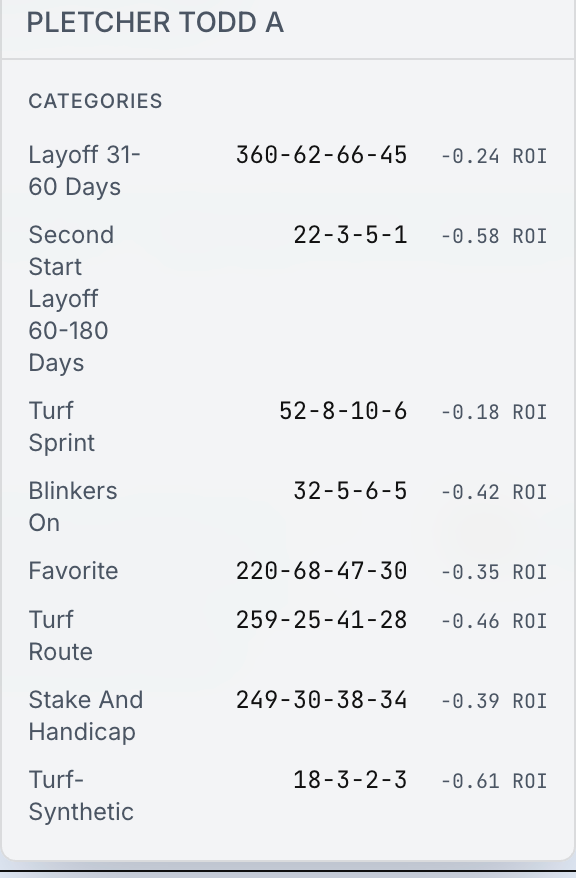
The stats popover shows a detailed breakdown of a trainer or jockey's record. Statistics include current meet record, recent performance (last 7/30 days), year-over-year records, applicable categories for the current race (e.g., "Layoff 31-60 Days", "Turf Sprint", "Blinkers On"), and ROI figures. For jockeys, a combined trainer-jockey record is also shown when available.
For horses, clicking the horse name shows career records by surface, track, and year.
Icons
The right side of each entry displays up to 6 icons highlighting important factors. See the Icon Reference at the end of this guide for a complete list. Hover over (or tap) any icon to see its description.
Workouts
Recent workouts appear at the bottom of each horse entry card (visible in the screenshot above). Each workout shows:
- Date - When the workout took place
- Track - Where the horse worked
- Distance & Surface - How far and on what surface
- Time - The workout time
- Ranking - How the workout ranked (e.g., "2/47" means 2nd fastest of 47 horses that day)
Workouts highlighted in red are "Monster Workouts" - exceptionally fast works indicating the horse is training sharply. Green highlighting indicates a turf workout.
Workouts are one of the most important handicapping tools, especially for first-time starters or horses returning from layoffs where past race form is limited or stale.
Past Performances
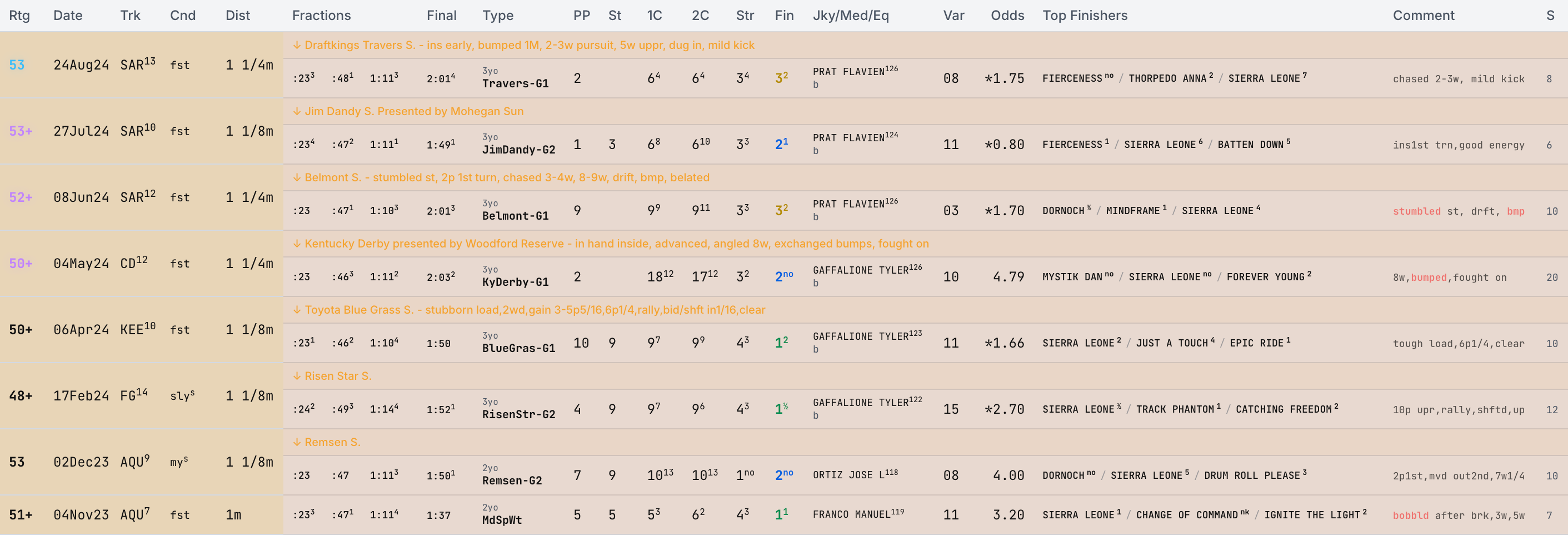
Click Expand PPs on any horse to see their race history. Each row is a past race showing:
- Rating - Our rating for that past race
- Date - When the race was run
- Track & Race - Track code and race number
- Condition - Track condition that day
- Distance - Race distance
- Fractional Times - Early pace splits and final time
- Class - Race type and age conditions
- Running Positions - Where the horse was at each call: start, first call, second call, stretch, and finish
- Jockey & Weight - Who rode and at what weight
- Medication & Equipment - Codes for that race
- Odds - The horse's closing odds (asterisk * marks the favorite)
- Top Finishers - The win/place/show horses with margins
- Trip Comment - Description of the horse's trip. Negative trip factors are highlighted, indicating trouble (stumbled, bumped, wide, blocked, etc.)
Color coding in PPs:
The most relevant past performance for today's race is highlighted in blue. Other applicable races are highlighted in purple. Less relevant races appear muted.
Surface background colors: Each past performance row has a subtle background color indicating the surface the race was run on. Brown/amber rows indicate dirt races, green rows indicate turf (grass) races, and blue rows indicate synthetic (all-weather) surface races. This makes it easy to quickly scan a horse's history and see which surface they have the most experience on.
Results Bar

Once a race is official, a results bar appears at the top of the race. It shows the top three finishers with their Win, Place, and Show payoffs, along with an accuracy badge indicating how many of our top 3 rated horses finished in the actual top 3 (e.g., "2/3"). Click Details to expand the full results table with every finisher's position and our predicted rank, plus Win/Place/Show payoffs and exotic payouts (Exacta, Trifecta, etc.) — or click Full Results to jump to the dedicated results page for that race card.
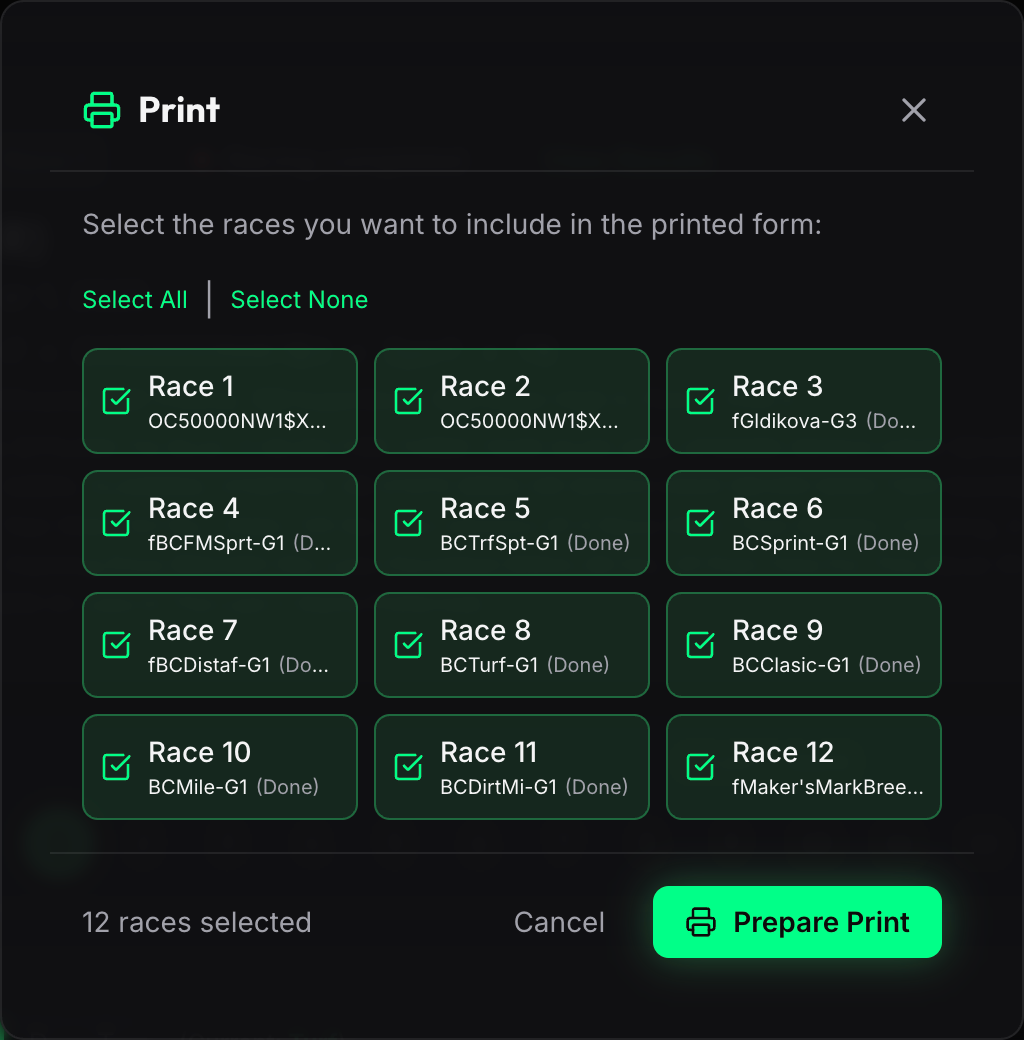
Click the Print button in the race selector bar (or press Ctrl+P / Cmd+P) to open the print dialog. From here you can:
- Select individual races by clicking on each race card. Each card shows the race number and classification.
- Select All / Select None to quickly toggle all races on or off.
- Prepare Print loads past performance data and generates a clean, landscape-formatted printout optimized for paper — great for taking to the track or OTB.
The printed form includes:
- Tier rankings & ratings — Each horse's tier badge and numerical rating
- Horse stats — Career and surface-specific records with earnings
- Connections — Jockey, trainer, weight, and claiming price
- Workouts — Up to 5 recent workouts with monster workout highlighting
- Past performances — Up to 5 recent races with fractional times, running positions, odds, and trip comments
- Race & horse notes — If you have a premium subscription with the Notes feature, your personal race notes appear as a preamble page before the form, and horse notes are printed on each horse's card.
The bottom of the modal shows how many races you have selected. Click Prepare Print when ready, then Print Now to send to your printer.
Calculator*

The E-Z Win® Form includes an integrated Exotic Wager Calculator accessible via the green calculator button in the bottom-right corner. The calculator has two modes:
Cost Calculator
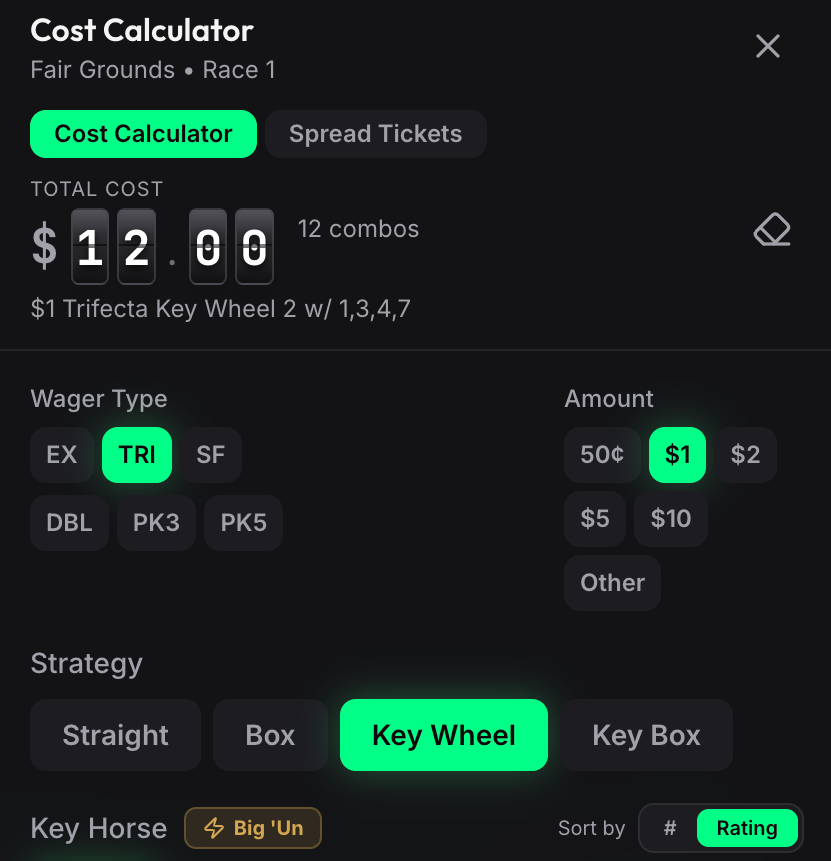
Calculate the exact cost of any exotic wager before placing your bet. Supports all wager types (Exacta through Pick 9) and all strategies (Straight, Box, Key Box, Key Wheel). Horse names and tier badges are pulled directly from the form. The Big 'Un button auto-fills selections using our tier-based strategy.
Spread Tickets
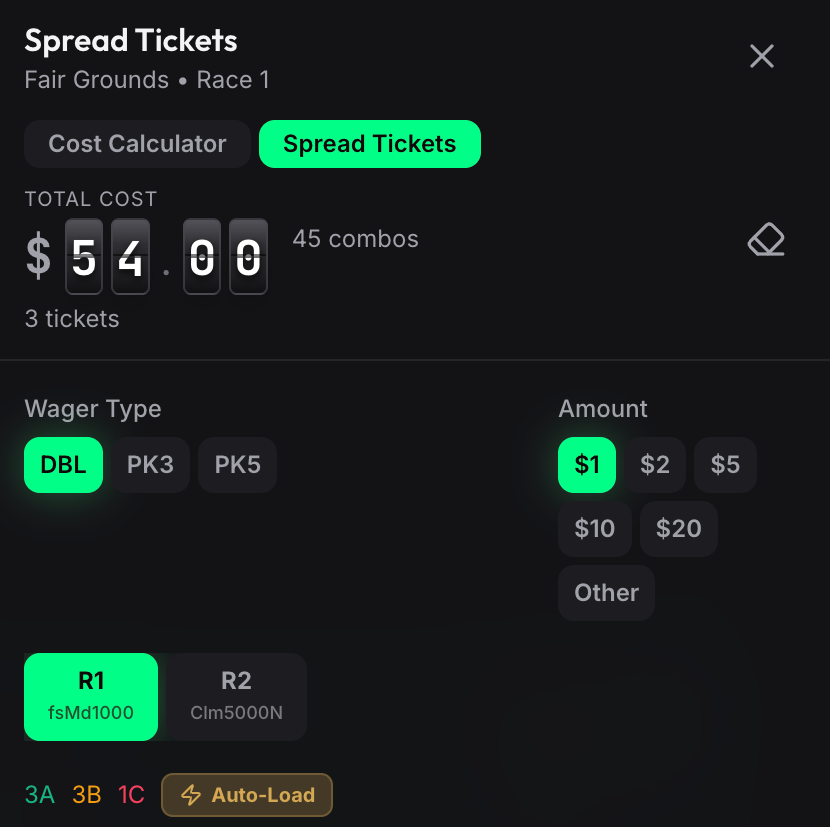
Build optimized multi-race tickets by classifying horses into A (top picks), B (contenders), and C (longshots) tiers. Set multipliers to control coverage at each level. The Auto-Load button fills classifications from your E-Z Win® tier ratings automatically.
Icon Reference
Here is a quick reference for all icons that may appear on the form. Up to 6 icons can appear on each horse entry, highlighting the most important handicapping factors at a glance. Hover over (or tap) any icon on the form to see its description.
Horse Status
| Icon | Meaning |
|---|---|
 | First Time Starter - This horse has never raced before. First-time starters are unpredictable since there is no race history to evaluate. Pay close attention to workouts and pedigree when assessing these horses. |
 | First Time Turf - This horse is racing on the turf (grass) for the first time. Our rating incorporates a pedigree analysis to predict how the horse may take to the new surface. Horses bred for turf can show dramatic improvement when switching from dirt to grass. |
 | New Gelding - This horse was recently gelded (castrated). Gelding often helps horses focus and settle, and many horses show significant improvement in their first few races after the procedure. |
Medication & Equipment
| Icon | Meaning |
|---|---|
 | First Time Lasix - This horse is racing with Lasix (a diuretic that prevents bleeding) for the first time. This is one of the strongest positive indicators in handicapping. Horses almost always improve when adding Lasix for the first time. |
 | First Time Bute - This horse is racing with Bute (a pain reliever, legal only at certain tracks) for the first time. The effect of Bute varies from horse to horse. Check past performances to see if the horse has run with or without Bute before, and how it performed in each case. |
 | Blinkers On - Blinkers have been added for this race. Blinkers limit a horse's peripheral vision to help it focus and run in a straight line. This equipment change can sharpen a horse that has been running greenly (erratically) or losing focus in the stretch. |
 | Blinkers Off - Blinkers have been removed for this race. Removing blinkers can help a horse that has been running too aggressively early, allowing it to relax and conserve energy for the stretch run. |
 | Shoe Change - This horse has a front or rear shoe adjustment from the last race. Shoe changes (such as adding or removing bar shoes, mud caulks, or racing plates) can affect a horse's grip and comfort on different surfaces and conditions. |
Fitness & Form
| Icon | Meaning |
|---|---|
 | Monster Workout - This horse posted an exceptionally fast recent workout. Monster workouts indicate the horse is training sharply and in peak current form. This is especially significant for horses returning from layoffs or first-time starters where workouts are the primary gauge of readiness. |
 | Layoff (45-179 days) - This horse has not raced in 45 to 179 days. Horses coming off moderate layoffs often need a race to regain their sharpness. However, the impact varies by track -- at higher-class tracks, even a short layoff can be detrimental, while at smaller tracks, horses can sometimes win first time back. Check workouts for signs of fitness. |
 | Layoff (180+ days) - This horse has not raced in 180 or more days. Extended layoffs are a significant concern. The horse may have been injured or needed time off, and returning to race fitness after this long is difficult. Strong recent workouts are essential before trusting a horse off a long layoff. |
 | Has Improved - This horse has shown measurable improvement in its recent races, based on our analysis of speed figures, running style, and finishing position. An improving horse is dangerous because it may not have peaked yet. |
 | Should Improve - Our analysis predicts this horse will run better today than its recent form suggests. Common reasons include a favorable surface or condition change, a class drop, a return from a "needed" race off a layoff, or a positive equipment/medication change. |
Class & Connections
| Icon | Meaning |
|---|---|
 | Raise in Class - This horse is moving up in class from its last race on the same surface. The horse is facing tougher competition today, which makes it harder to win. However, some horses are good enough to compete at a higher level, especially if they won easily last time. |
 | Drop in Class - This horse is dropping in class from its last race on the same surface. This is one of the most important factors in handicapping. A horse that was competitive against better horses is now facing weaker competition and should have a significant advantage. Examples of notable drops include Allowance to Claiming or a large claiming price reduction. |
 | Jockey Change - The jockey has changed since the horse's last race. The form shows the previous jockey's record at the track where the horse last raced and the current jockey's record at today's track, so you can compare. While jockeys cannot make a horse run beyond its ability, a better rider can make a difference in close finishes and race tactics. |
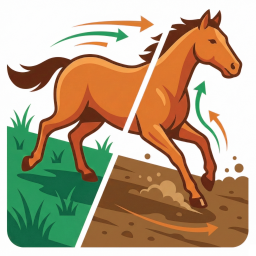 | Turf to Dirt - This horse is switching surfaces from its last race (turf to dirt or dirt to turf). Surface switches can dramatically change a horse's performance. Some horses are simply better suited to one surface, and a switch to their preferred surface can result in a huge improvement. |
Race History
| Icon | Meaning |
|---|---|
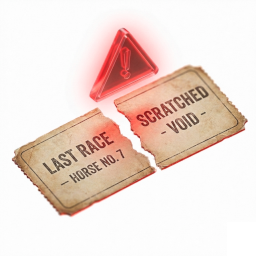 | Scratched Last Entry - This horse was entered in a previous race but was scratched (withdrawn) before the race was run. Scratches can happen for many reasons including minor health issues, unfavorable post position or track condition, or trainer strategy. The horse was ready to race recently, which can be a positive fitness indicator. |
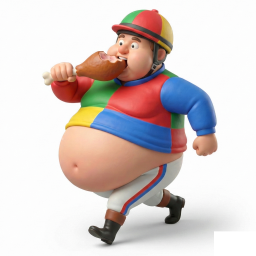 | Overweight - The jockey is carrying more weight than the assigned weight for this horse. The extra pounds are shown on the form. While a pound or two is generally not a major concern, significant overweight (3+ pounds) can be a negative, especially in longer races where the extra weight takes a toll over the distance. |
* Indicates a premium feature, available to Clubhouse and Winner's Circle subscribers.